+44 130 677 0855
 Email
+44 130 677 0855
Email
Email
+44 130 677 0855
Email
The delivery price is calculated during checkout based on your location and the goods ordered. Our basic delivery prices are:
Delivery within Australia: $48.00
Delivery Service: Five working days*
* For products that are in stock and the order received by midday.
Some products go through a final configuration and calibration before being shipped. If the calibration labs are busy this can add up to two days on to the delivery schedule but guarantees a fresh calibration.
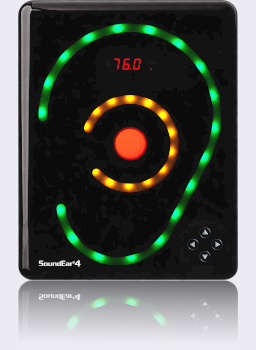
The SoundEar 4 is the top of the noise warning sign range, adding many useful features to those offered in the SoundEar II. This version of the SoundEar is ideal for carrying out long term noise checks but also giving an instant and clear warning of high noise levels.
The SoundEar 4 can be set to have different sound level triggers and displays (lit or flashing) depending on the time of day. For example, noise in a hospital is often more important at night, but a flashing light is not so desirable. The sign can be set to light up at a lower sound level at night and not to flash. You could even set it to only show the central red light at night and leave the green and yellow switched off.
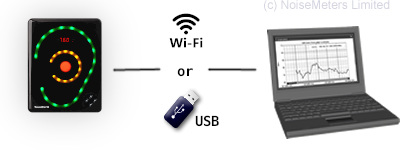
You can connect the SoundEar 4 to a computer by USB or over WiFi and use the software that is included to configure it.
The SoundEar 4 is supplied with a plug-in microphone. It connects at the bottom of the sign and remains out of sight and out of harm's way. However, if you need to mount the microphone away from the sign then you can use a microphone extension cable, which should be ordered separately, order code SE4EXT.
The SoundEar 4 has a memory that stores the sound level every minute. When downloaded to a computer this gives a detailed graph of the noise throughout the day. The measurements can be transferred to a computer over a WiFi connection or using a USB memory stick, which is ideal in environments where a network connection is not available.
The SoundEar 4 Industrial can also output data over a Modbus TCP interface for integration with other systems. Please contact NoiseMeters for more information about this.
The SoundEar 4 is designed for noise warning and long term monitoring in environments where the appearance of the device is important. This version of the sign is particularly suited to low noise environments, although the range covers almost any application.
Mounted on the wall in rooms and corridors, the SoundEar 4 gives a clear reminder for staff and visitors to keep the noise levels down. This version of the SoundEar is particularly suited to the hospital environment as it can be set to function differently during the day and during the night. For night time the trigger levels can be lower and the lights less obtrusive. See the Displays page for more information.
With the noise levels stored and downloaded to the software, you can carry out long term monitoring to assess the success of a noise control program and to identify the noisy times of day.
Data storage and software are included with the standard SoundEar 4.
The SoundEar 4 gives a clear reminder to everybody that noise levels should be kept down. The SoundEar 4 operates down to 30 dB, making it ideal for such low noise environments.
Noise in the office, especially in open plan layouts, can be a sensitive issue - the person making the noise is upsetting the work of others, but may not be aware of the issue and be embarrassed by being asked to quieten down. The SoundEar gives a clear indication that the noise levels are high without the subjective nature of the human ear.
The sign is just a reminder that too much noise is being made and with the data logging facility (included) you can monitor the long term noise environment.
High noise levels in pubs, clubs and other entertainment venues cause a health risk for staff and the risk of complaints from local residents. The SoundEar 4 can be used to warn when quieter areas get too loud (risk of hearing damage for staff) and can also warn whoever controls the music that the general sound levels are too high, risking complaint.
The SoundEar 4 has a Modbus TCP interface that can be connected to other systems for monitoring or process control.
Installation of the SoundEar 4 consists of two parts: mounting it on the wall and setting up the display.
The easiest way to mount the SoundEar 4 on the wall is using a single screw and hanging the sign, just like a picture.
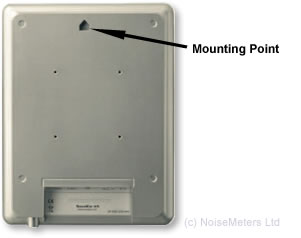
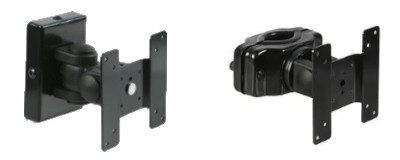
For a more permanent mounting, angled viewing and corner mounting you can use the optional VESA mount (order code SE2VESA). The mount is first fixed to the back of the SoundEar Noise Sign and a VESA mounting bracket is fixed to the wall. The Noise Sign and mount are then fixed to the wall bracket.
We also provide a bracket to mount the SoundEar to a 30 to 50 mm pole (order code SE2VESAP).
The SoundEar 4 comes complete with a USB-C plug-top power adapter. This provides the safe low voltage that the noise sign requires.
The SoundEar 4 has been developed for use in areas that need high electrical safety, such as hospitals. This optional P-SE3-MED power adapter is approved in accordance with IEC 60601-1 (medical electrical equipment).
The perfect location for a sign depends on the layout and the acoustics of the area in question. The most important aspect of the SoundEar is that it reminds people to keep the level down, so it is best to mount it where clearly visible to anybody entering the room or area.
There is also no simple rule about the level at which the sign should light up. Different areas have different ambient noise levels and different acceptable limits. When a reasonable background level is required for conversation then a good starting point is to set the noise sign to light up at 55 dB(A) with the yellow lights will coming on at 50 dB(A). Run the sign for a few hours, or even a few days, and get a feel for whether it is being too sensitive for the given environment or whether it is letting people get away with too much. Adjust up or down by 5 dB as needed.
The SoundEar 4 can be configured in many ways, with different trigger levels for the green, yellow and red lights, as well as different trigger durations and minimum lighting periods. It can also be set to have different settings for night time and will switch to those at the set times.
While some of the configuration can be carried out using the controls on the front of the sign (four arrow keys), it is often more convenient to use the software. There are three ways to do this:
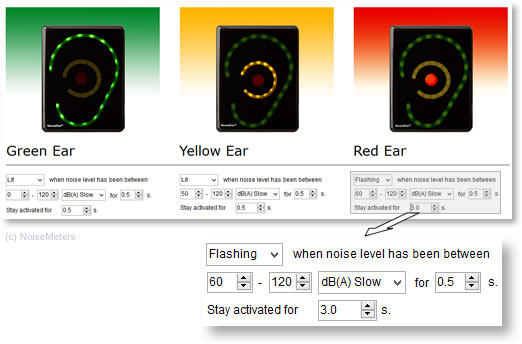
In this example the Red light is set to flash when the sound levels are above 60dB for at least 0.5 seconds. It will flash for at least 3 seconds.
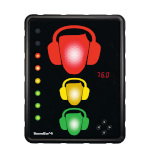
The SoundEar 4 has four main display components:
You can have two different time periods set, so you can have it operating with one configuration during the day and another during the night. It will switch between these settings at the times you select.
No matter what the display is showing, the SoundEar 4 is still monitoring and logging the sound levels. It could even be left showing just the time or nothing at all, thus avoiding people shouting or whistling to see it react. If this is all you need to do then have a look at the SE3-320, which costs less and has just the small digital display.
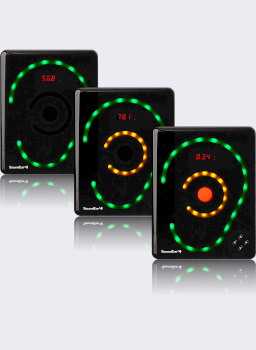
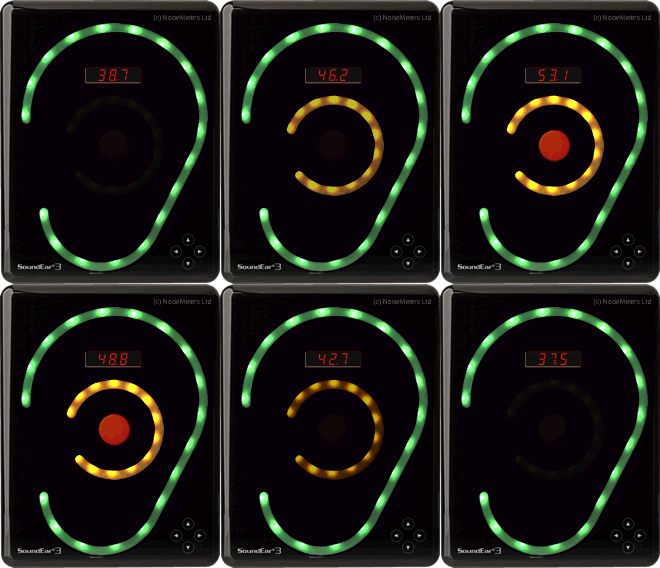
These sample displays give an idea of some of the different configurations that are possible.
1. Dual Level Display - The most common configuration. The Green lights are on all the time to remind everybody that the noise levels are being monitored. In this example the green light is on all the time, the yellow comes on at 45 dB and the red at 50 dB.
2. Night Time Minimal - All display options are disabled except for the central red warning light. Ideal for hospital units at night. In this case all lights are off, with the red central light coming on above 50 dB.
3. High Impact Flash - For maximum impact when the threshold is passed, the sign remains dark and then flashes all three indicators at the same time. In this example all lights are off until the level reaches 85 dB, when all red, yellow and green lights flash.
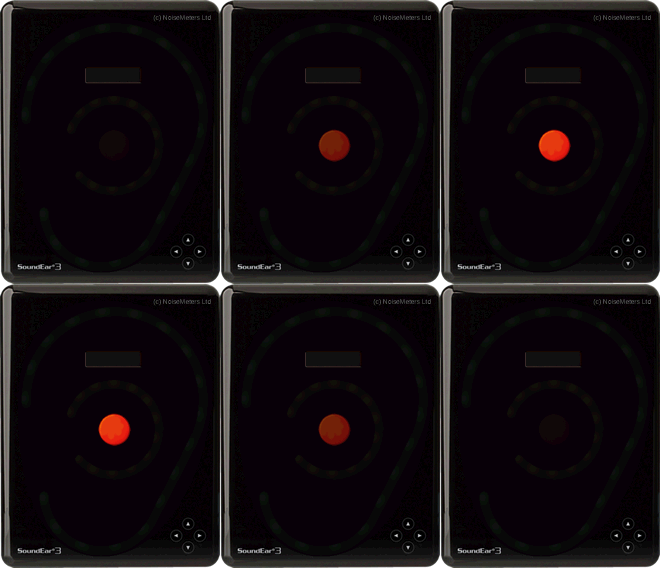
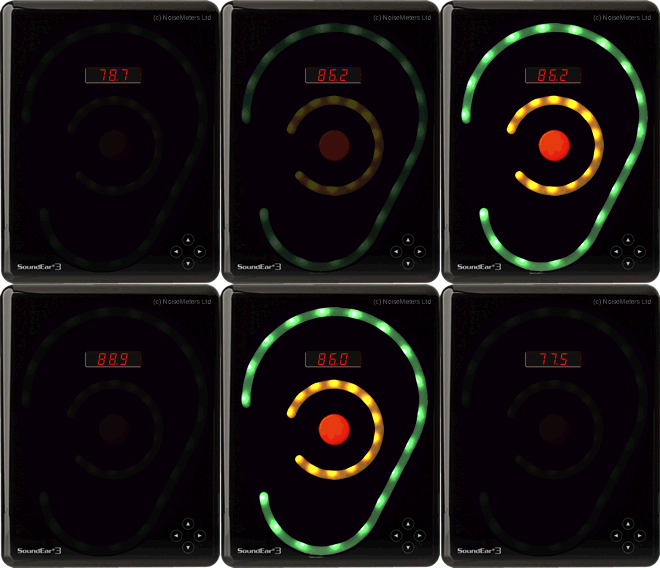
The SoundEar 4 is a data logging noise sign and comes complete with software to configure, download and display the results.
The software is included with the SoundEar 4 at no extra charge. It is designed for all recent versions of Windows. It communicates with the sign via the computer's USB port. Downloads and configuration can be carried out via a memory stick, so you don't have to take the sign down from the wall each time.
Measurements that have been stored in the noise warning sign can be downloaded to a computer for analysis and reporting. You can connect the sign directly to a computer's USB port, over a WiFi connection or download via a USB memory stick.
When using a memory stick the SoundEar 4 XL will automatically transfer its measurements on to a memory stick that is plugged in. You then take the memory stick to a computer and load it into the SoundEar software.
You can also view the live sound levels by connecting the SoundEar 4 XL Industrial over WiFi or via the computer's USB port and running the SoundEar software.
The SoundEar 4 stores noise measurements in its internal memory. You can configure it to store a minimal amount of information for longer, or to store everything for a shorter period of time.
For most applications the Noise Processor's internal memory is large enough for more than 18 months storage without download - although of course we would recommend regular download to avoid data loss.
If you have a Sound Level Calibrator and need to ensure the accurate operation of the SoundEar 4 then the software deals with this. Connect the SoundEar 4 to the software, connect a microphone extension cable and fit the calibrator to the microphone. The software Microphone Calibration option will then deal with the process of checking and adjusting.
)
The SoundEar software can configure the sign's digital display (the red numbers in the middle) to show:
Although the default is to show the sound level, it can be useful to turn this off if it causes confusion (not everybody understands dB) or if it causes people to make noise to see how loud they are!
You can use the software to set trigger levels and times for each of the lights - green, yellow and red. For each of the three lights you can set:
Trigger based on:
You can also have another set of triggers for night time, in case you have an environment, such as a hospital, where the acceptable sound levels are lower at night.
The standard SoundEar 4 order codes (SE4EAR or SE4EAR-x for multi packs) include everything needed for most applications:
The SE4EAR-x Multi Packs include all these items for each SoundEar 4. They also include an NM102 Hand Held Sound Level Meter, which can be used for making quick measurements of sound levels in the surrounding area, and can be helpful when setting the signs up.
For more information about the sound level meter, please visit the NM102 Sound Level Meter page.
| Order Code | |
| SE4EAR | SoundEar 4 Noise Warning Sign Wall mounted logging noise sign with advanced config. Includes microphone, power adapter and software. |
| SE4EAR-5 | Pack with 5 Noise Signs and a Sound Meter This discounted package includes five SoundEar 4 signs and a hand-held sound level meter. |
| SE4EAR-10 | Pack with 10 Noise Signs and a Sound Meter This discounted package includes ten SoundEar 4 signs and a hand-held sound level meter. |
| CR514 | Sound Level Calibrator A Class 2 calibrator for checking the function and accuracy of the noise warning sign. |
| SE2VESA | VESA Wall Mount For angled or corner mounting of the SoundEar. More secure if the single screw mount is not adequate. |
| SE2VESAP | Pole Mount To fix the SoundEar to a 30 to 50 mm pole (not included). |
| Standards | IEC 61672-1 Class 2, ANSI S1.43 Type 2 |
| Frequency Range | 20Hz to 20kHz |
| Measuring Range | 30 to 120 dB |
| Deviation | ± 0.5 dB |
| Frequency Weighting | "A" ("C" weighted Peak) |
| Time Weighting | Fast and Slow |
| Digital Display | LAeq,1s, Alarm level, Clock |
| Connectivity | WiFi, Modbus TCP |
| USB Ports | 1. USB-C (power and PC connection) 2. USB Controller (for USB memory stick connection) |
| Cabinet | Shockproof acrylic |
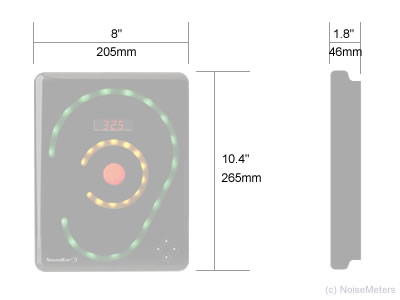
| Dimensions | 265 x 205 x 46 mm, 10.4" x 8" x 1.8" |
| Weight | 1.5 kg, 3.3 lb |
| Power | 5 VDC (USB-C) |
 Cart
Cart